mirror of
https://github.com/fergalmoran/SilkierQuartz.git
synced 2025-12-22 09:37:56 +00:00

119 lines
4.9 KiB
Markdown
119 lines
4.9 KiB
Markdown
|
|
|
|
[](https://www.nuget.org/packages/SilkierQuartz)
|
|
[](LICENSE)
|
|
[](https://ci.appveyor.com/project/MaiKeBing/silkierquartz)
|
|

|
|
|
|
SilkierQuartz is a new after merging [Quartzmin](https://github.com/jlucansky/Quartzmin) and [QuartzHostedService](https://github.com/mukmyash/QuartzHostedService)!
|
|
|
|
> [Quartz.NET](https://www.quartz-scheduler.net) is a full-featured, open source job scheduling system that can be used from smallest apps to large scale enterprise systems.
|
|
|
|
|
|
> [Quartzmin](https://github.com/jlucansky/Quartzmin) Quartzmin is powerful, easy to use web management tool for Quartz.NET
|
|
|
|
> [QuartzHostedService](https://github.com/mukmyash/QuartzHostedService) QuartzHostedService is easy to host Quartz as service in .Net Core !
|
|
|
|
|
|
So
|
|
|
|
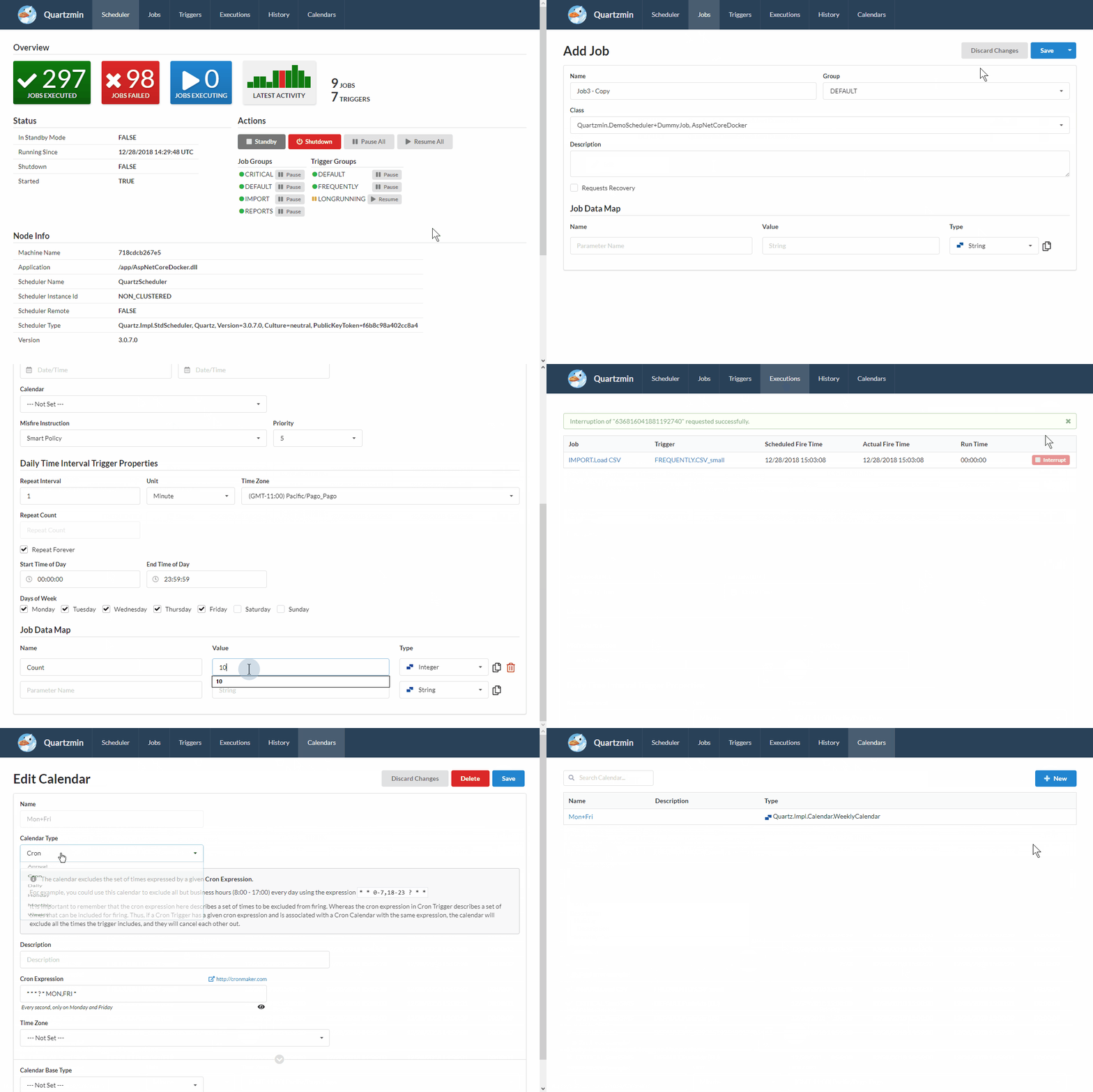
SilkierQuartz can be used within your existing application with minimum effort as a Quartz.NET plugin when it automatically creates embedded web server.
|
|
|
|
|
|
|
|
|
|
The goal of this project is to provide convenient tool to utilize most of the functionality that Quartz.NET enables. The biggest challenge was to create a simple yet effective editor of job data map which is heart of Quartz.NET. Every job data map item is strongly typed and SilkierQuartz can be easily extended with a custom editor for your specific type beside standard supported types such as String, Integer, DateTime and so on.
|
|
|
|
SilkierQuartz was created with **Semantic UI** and **Handlebars.Net** as the template engine.
|
|
|
|
## SilkierQuartz's Features
|
|
- automatically discover IJob subclasses with SilkierQuartzAttribute
|
|
- With QuartzHostedService and more extensions
|
|
- Authentication feature , by [khanhna](https://github.com/khanhna)
|
|
|
|
|
|
## Quartzmin's Features
|
|
- Add, modify jobs and triggers
|
|
- Add, modify calendars (Annual, Cron, Daily, Holiday, Monthly, Weekly)
|
|
- Change trigger type to Cron, Simple, Calendar Interval or Daily Time Interval
|
|
- Set typed job data map values (bool, DateTime, int, float, long, double, decimal, string, byte[])
|
|
- Create custom type editor for complex type in job data map
|
|
- Manage scheduler state (standby, shutdown)
|
|
- Pause and resume job and trigger groups
|
|
- Pause and resume triggers individually
|
|
- Pause and resume all triggers for specific job
|
|
- Trigger specific job immediately
|
|
- Watch currently executing jobs
|
|
- Interrupt executing job
|
|
- See next scheduled dates for Cron
|
|
- See recent job history, state and error messages
|
|
|
|
## Install
|
|
SilkierQuartz is available on [nuget.org](https://www.nuget.org/packages/SilkierQuartz)
|
|
|
|
To install SilkierQuartz, run the following command in the Package Manager Console
|
|
```powershell
|
|
PM> Install-Package SilkierQuartz
|
|
```
|
|
|
|
|
|
|
|
|
|
### ASP.NET Core middleware
|
|
Add to your `Program.cs` file:
|
|
|
|
```csharp
|
|
public class Program
|
|
{
|
|
public static void Main(string[] args)
|
|
{
|
|
CreateHostBuilder(args).Build().Run();
|
|
}
|
|
|
|
public static IHostBuilder CreateHostBuilder(string[] args) =>
|
|
Host.CreateDefaultBuilder(args)
|
|
.ConfigureWebHostDefaults(webBuilder =>
|
|
{
|
|
webBuilder.UseStartup<Startup>();
|
|
})
|
|
.ConfigureSilkierQuartzHost();
|
|
}
|
|
|
|
```
|
|
Add to your `Startup.cs` file:
|
|
```csharp
|
|
public void ConfigureServices(IServiceCollection services)
|
|
{
|
|
services.AddSilkierQuartz();
|
|
}
|
|
|
|
public void Configure(IApplicationBuilder app)
|
|
{
|
|
/* Optional for authentication
|
|
app.UseAuthentication();
|
|
app.AddSilkierQuartzAuthentication();
|
|
app.UseAuthorization();
|
|
*/
|
|
app.UseSilkierQuartz(new SilkierQuartzOptions()
|
|
{
|
|
Scheduler = scheduler,
|
|
VirtualPathRoot = "/SilkierQuartz",
|
|
UseLocalTime = true,
|
|
DefaultDateFormat = "yyyy-MM-dd",
|
|
DefaultTimeFormat = "HH:mm:ss"
|
|
/* Optional for authentication
|
|
AccountName = "Your User Name",
|
|
AccountPassword = "Your User Password",
|
|
IsAuthenticationPersist = false
|
|
*/
|
|
});
|
|
}
|
|
```
|
|
|
|
## Notes
|
|
In clustered environment, it make more sense to host SilkierQuartz on single dedicated Quartz.NET node in standby mode and implement own `IExecutionHistoryStore` depending on database or ORM framework you typically incorporate. Every clustered Quarz.NET node should be configured with `ExecutionHistoryPlugin` and only dedicated node for management may have `SilkierQuartzPlugin`.
|
|
|
|
|
|
## License
|
|
This project is made available under the MIT license. See [LICENSE](LICENSE) for details.
|