mirror of
https://github.com/fergalmoran/SilkierQuartz.git
synced 2025-12-22 09:37:56 +00:00

109 lines
4.3 KiB
Markdown
109 lines
4.3 KiB
Markdown
|
||
|
||
[](https://www.nuget.org/packages/SilkierQuartz)
|
||
[](LICENSE)
|
||
[](https://ci.appveyor.com/project/MaiKeBing/silkierquartz)
|
||

|
||
|
||
SilkierQuartz 是一个新的合并了 [Quartzmin](https://github.com/jlucansky/Quartzmin) 和 [QuartzHostedService](https://github.com/mukmyash/QuartzHostedService)的组件!
|
||
|
||
> [Quartz.NET](https://www.quartz-scheduler.net) 是一个完整的开源的任务规划系统,从小应用至大型企业级应用都可以适用.
|
||
|
||
|
||
> [Quartzmin](https://github.com/jlucansky/Quartzmin) Quartzmin 是一个 Quartz.NET 的强大且简单的Web管理工具
|
||
|
||
> [QuartzHostedService](https://github.com/mukmyash/QuartzHostedService) QuartzHostedService 是一个用来以 HostedService 的方式运行Quartz的组件!
|
||
|
||
|
||
因此
|
||
|
||
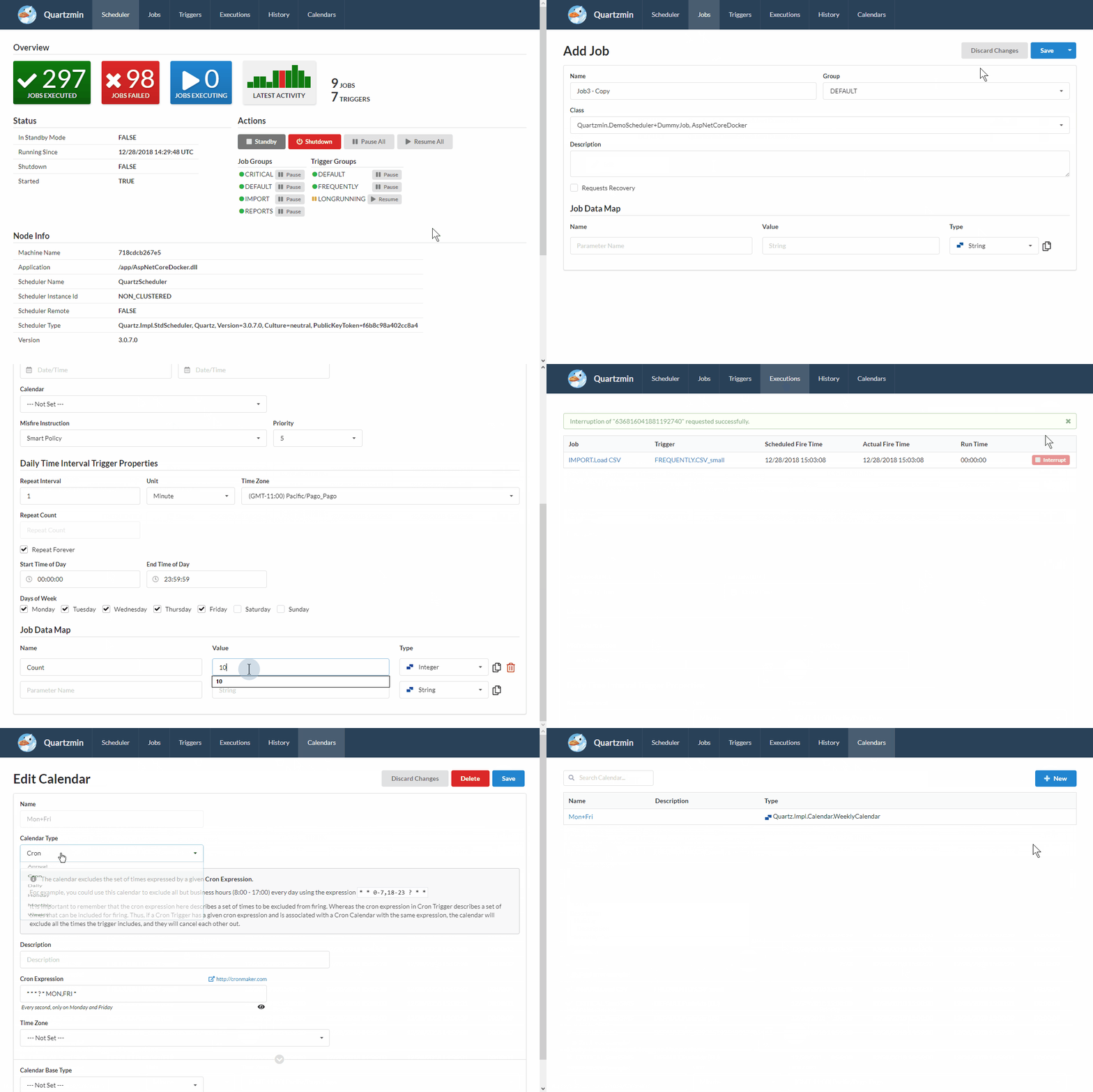
SilkierQuartz 可以在你已有应用程序内可以通过最小改动的使用的Quartz.NET 并通过Asp.Net Core 3.1 中间件的方式创建 Web页面目录并且没有任何额外的内容。
|
||
|
||
|
||
|
||
|
||
这个项目的目标是提供方便的工具,以利用Quartz.NET大部分功能。最大的挑战是创建一个简单而有效的作业数据映射编辑器,这是Quartz.NET的核心。每个作业数据映射项都易于输入,SilkierQuartz 可以轻松地使用自定义编辑器来扩展您的特定类型,比如常见的数据类型(如 string、int 、DateTime 等)。
|
||
SilkierQuartz 是一个通过 **Semantic UI** 和 **Handlebars.Net** 模板引擎创建.
|
||
|
||
## SilkierQuartz的新功能
|
||
- 自动发现作业并通过 SilkierQuartzAttribute进行规划启动
|
||
- 支持 HostedService 以及更多的扩展函数
|
||
|
||
|
||
## Quartzmin的特性
|
||
- 添加修改任务和触发器
|
||
- 添加修改日历 (Annual, Cron, Daily, Holiday, Monthly, Weekly)
|
||
- 更改触发器类型为 Cron, Simple, Calendar Interval 或 Daily Time Interval
|
||
- 设置强类型的作业数据映射 (bool, DateTime, int, float, long, double, decimal, string, byte[])
|
||
- 针对复杂的作业数据映射类型创建自定义类型编辑器
|
||
- 管理规划的状态 (standby, shutdown)
|
||
- 暂停挥着回复作业和触发器组
|
||
- 单独暂停和恢复触发器
|
||
- 针对指定的作业进行暂停和恢复所有触发器
|
||
- 立即触发指定的作业
|
||
- 监视当前执行的作业
|
||
- 中断正在执行作业
|
||
- 查看Cron的下一个规划时间
|
||
- 查看最近作业历史、状态、错误消息
|
||
|
||
## Install
|
||
SilkierQuartz 位于 [nuget.org](https://www.nuget.org/packages/SilkierQuartz)
|
||
|
||
要安装 SilkierQuartz,在 Package Manager Console运行下面的命令
|
||
```powershell
|
||
PM> Install-Package SilkierQuartz
|
||
```
|
||
## 最小必备
|
||
|
||
- .NET Core 3.1
|
||
|
||
|
||
|
||
|
||
### ASP.NET Core 中间件
|
||
添加到ConfigureSilkierQuartzHost 到 `Program.cs` 文件的代码如下:
|
||
|
||
```csharp
|
||
public class Program
|
||
{
|
||
public static void Main(string[] args)
|
||
{
|
||
CreateHostBuilder(args).Build().Run();
|
||
}
|
||
|
||
public static IHostBuilder CreateHostBuilder(string[] args) =>
|
||
Host.CreateDefaultBuilder(args)
|
||
.ConfigureWebHostDefaults(webBuilder =>
|
||
{
|
||
webBuilder.UseStartup<Startup>();
|
||
})
|
||
.ConfigureSilkierQuartzHost();
|
||
}
|
||
|
||
```
|
||
添加到你的 `Startup.cs` 文件:
|
||
```csharp
|
||
public void ConfigureServices(IServiceCollection services)
|
||
{
|
||
services.AddSilkierQuartz();
|
||
}
|
||
|
||
public void Configure(IApplicationBuilder app)
|
||
{
|
||
app.UseSilkierQuartz(new SilkierQuartzOptions()
|
||
{
|
||
Scheduler = scheduler,
|
||
VirtualPathRoot = "/SilkierQuartz",
|
||
UseLocalTime = true,
|
||
DefaultDateFormat = "yyyy-MM-dd",
|
||
DefaultTimeFormat = "HH:mm:ss"
|
||
});
|
||
}
|
||
```
|
||
|
||
## 注意
|
||
在集群环境,可以通过实现`IExecutionHistoryStore` 使用数据库或者ORM共享数据, 每一个 Quarz.NET节点必须使用 `ExecutionHistoryPlugin` 并只通过 `SilkierQuartzPlugin`.
|
||
|
||
## 许可
|
||
此项目基于 MIT license. 请查看 [LICENSE](LICENSE) 了解更多信息.
|