 e2ed6ef741
The mmap interface was removed when we introduced the DisplayConnector
class, as it was quite unsafe to use and didn't handle switching between
graphical and text modes safely. By using the SharedFramebufferVMObject,
we are able to elegantly coordinate the switch by remapping the attached
mmap'ed-Memory::Region(s) with different mappings, therefore, keeping
WindowServer to think that the mappings it has are still valid, while
they are going to a different physical range until we are back to the
graphical mode (after a switch from text mode).

Most drivers take advantage of the fact that we know where is the actual
framebuffer in physical memory space, the SharedFramebufferVMObject is
created with that information. However, the VirtIO driver is different
in that aspect, because it relies on DMA transactions to show graphics
on the framebuffer, so the SharedFramebufferVMObject is created with
that mindset to support the arbitrary framebuffer location in physical
memory space.
SerenityOS
Graphical Unix-like operating system for x86 computers.



About
SerenityOS is a love letter to '90s user interfaces with a custom Unix-like core. It flatters with sincerity by stealing beautiful ideas from various other systems.
Roughly speaking, the goal is a marriage between the aesthetic of late-1990s productivity software and the power-user accessibility of late-2000s *nix. This is a system by us, for us, based on the things we like.
You can watch videos of the system being developed on YouTube:
FAQ: Frequently Asked Questions
Screenshot
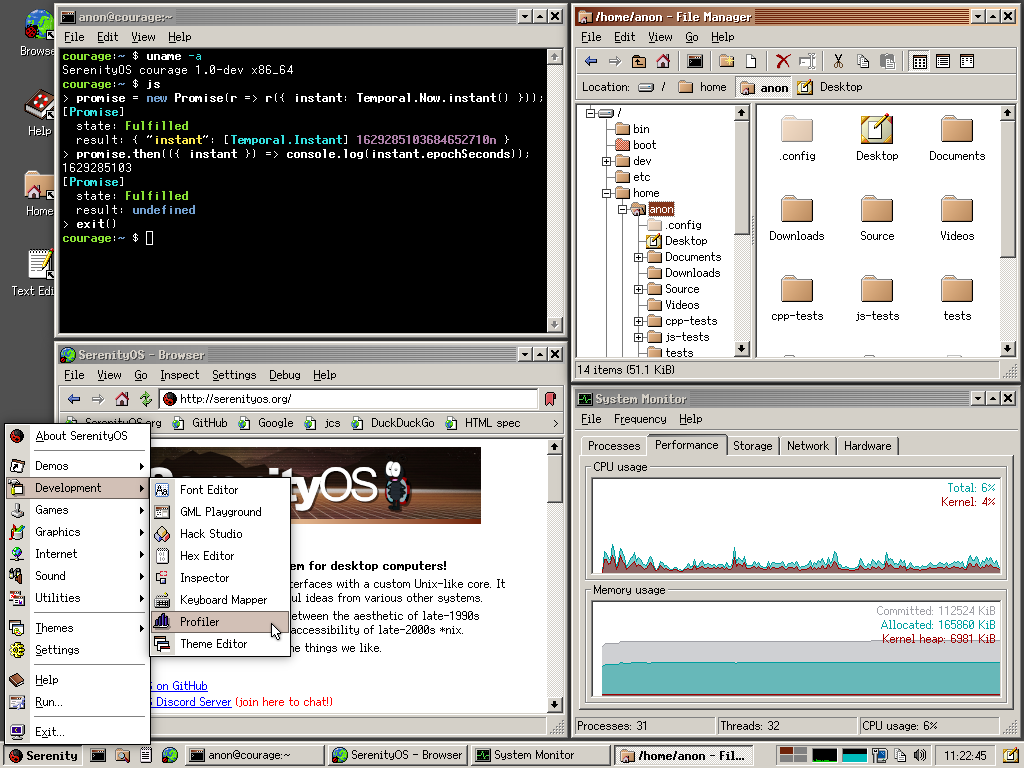
Features
- Modern x86 32-bit and 64-bit kernel with pre-emptive multi-threading
- Browser with JavaScript, WebAssembly, and more (check the spec compliance for JS, CSS, and WASM)
- Security features (hardware protections, limited userland capabilities, W^X memory,
pledge&unveil, (K)ASLR, OOM-resistance, web-content isolation, state-of-the-art TLS algorithms, ...) - System services (WindowServer, LoginServer, AudioServer, WebServer, RequestServer, CrashServer, ...) and modern IPC
- Good POSIX compatibility (LibC, Shell, syscalls, signals, pseudoterminals, filesystem notifications, standard Unix utilities, ...)
- POSIX-like virtual file systems (/proc, /dev, /sys, /tmp, ...) and ext2 file system
- Network stack and applications with support for IPv4, TCP, UDP; DNS, HTTP, Gemini, IMAP, NTP
- Profiling, debugging and other development tools (Kernel-supported profiling, detailed program analysis with software emulation in UserspaceEmulator, CrashReporter, interactive GUI playground, HexEditor, HackStudio IDE for C++ and more)
- Libraries for everything from cryptography to OpenGL, audio, JavaScript, GUI, playing chess, ...
- Support for many common and uncommon file formats (PNG, JPEG, GIF, MP3, WAV, FLAC, ZIP, TAR, PDF, QOI, Gemini, ...)
- Unified style and design philosophy, flexible theming system, custom (bitmap and vector) fonts
- Games (Solitaire, Minesweeper, 2048, chess, Conway's Game of Life, ...) and demos (CatDog, Starfield, Eyes, mandelbrot set, WidgetGallery, ...)
- Every-day GUI programs and utilities (Spreadsheet with JavaScript, TextEditor, Terminal, PixelPaint, various multimedia viewers and players, Mail, Assistant, Calculator, ...)
... and all of the above are right in this repository, no extra dependencies, built from-scratch by us :^)
Additionally, there are over two hundred ports of popular open-source software, including games, compilers, Unix tools, multimedia apps and more.
How do I read the documentation?
Man pages are available online at man.serenityos.org. These pages are generated from the Markdown source files in Base/usr/share/man and updated automatically.
When running SerenityOS you can use man for the terminal interface, or help for the GUI.
Code-related documentation can be found in the documentation folder.
How do I build and run this?
See the SerenityOS build instructions. Serenity runs on Linux, macOS (aarch64 might be a challenge), Windows (with WSL2) and many other *Nixes with hardware or software virtualization.
Get in touch and participate!
Join our Discord server: SerenityOS Discord
Before opening an issue, please see the issue policy.
A general guide for contributing can be found in CONTRIBUTING.md.
Authors
- Andreas Kling - awesomekling
- Robin Burchell - rburchell
- Conrad Pankoff - deoxxa
- Sergey Bugaev - bugaevc
- Liav A - supercomputer7
- Linus Groh - linusg
- Ali Mohammad Pur - alimpfard
- Shannon Booth - shannonbooth
- Hüseyin ASLITÜRK - asliturk
- Matthew Olsson - mattco98
- Nico Weber - nico
- Brian Gianforcaro - bgianfo
- Ben Wiederhake - BenWiederhake
- Tom - tomuta
- Paul Scharnofske - asynts
- Itamar Shenhar - itamar8910
- Luke Wilde - Lubrsi
- Brendan Coles - bcoles
- Andrew Kaster - ADKaster
- thankyouverycool - thankyouverycool
- Idan Horowitz - IdanHo
- Gunnar Beutner - gunnarbeutner
- Tim Flynn - trflynn89
- Jean-Baptiste Boric - boricj
- Stephan Unverwerth - sunverwerth
- Max Wipfli - MaxWipfli
- Daniel Bertalan - BertalanD
- Jelle Raaijmakers - GMTA
- Sam Atkins - AtkinsSJ
- Tobias Christiansen - TobyAsE
- Lenny Maiorani - ldm5180
- sin-ack - sin-ack
- Jesse Buhagiar - Quaker762
- Peter Elliott - Petelliott
- Karol Kosek - krkk
- Mustafa Quraish - mustafaquraish
- David Tuin - davidot
- Leon Albrecht - Hendiadyoin1
- Tim Schumacher - timschumi
- Marcus Nilsson - metmo
- Gegga Thor - Xexxa
- kleines Filmröllchen - kleinesfilmroellchen
- Kenneth Myhra - kennethmyhra
- Maciej - sppmacd
- Sahan Fernando - ccapitalK
And many more! See here for a full contributor list. The people listed above have landed more than 100 commits in the project. :^)
License
SerenityOS is licensed under a 2-clause BSD license.