0672e54401
* replace jq-promises with native Promises

* updates to use native promises and async await

* Fix variable errors, remove extra parameters and correct export declaratons

* refactor launch request to use async/await

* fix running debugger on custom ADB port

* remove unused files

* move socket_ended check to ensure we don't loop reading 0 bytes

* refactor logcat code and ensure disconnect status is passed on to webview

* Fix warnings

* Clean up util and remove unused functions

* convert Debugger into a class

* update jsconfig target to es2018 and enable checkJS

* more updates to use async/await and more readable refactoring.

- added type definitions and debugger classes
- improved expression evaluation
- refactored expressions into parsing, evaluation and variable assignment
- fixed invoking methods with parameters
- added support for static method invokes
- improved exception display reliability
- refactored launch into smaller functions
- refactored utils into smaller modules
- removed redundant code
- converted JDWP functions to classes

* set version 1.0.0 and update dependencies

* add changelog notes
Android for VS Code
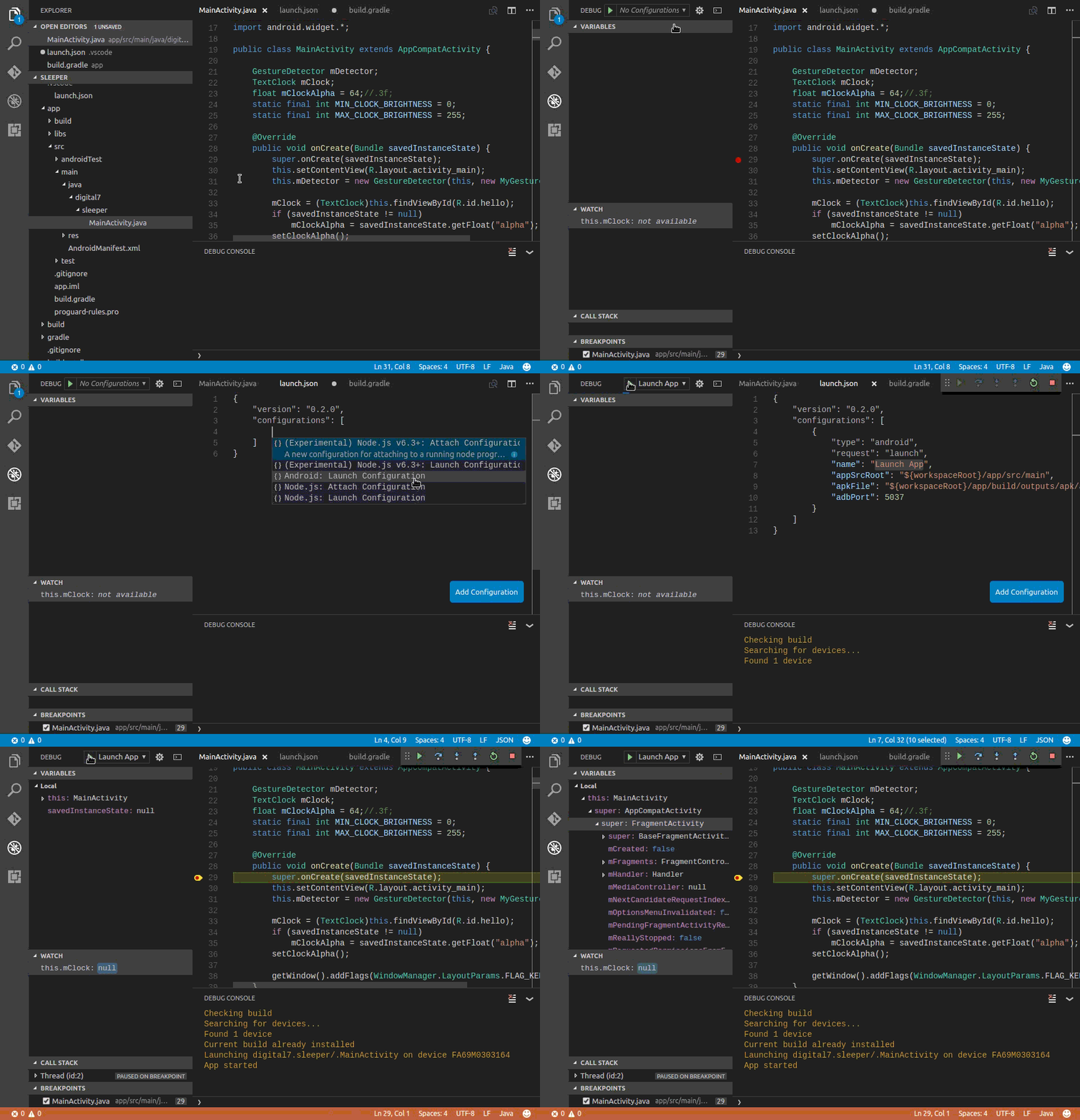
This is a preview version of the Android for VS Code Extension. The extension allows developers to install, launch and debug Android Apps from within the VS Code environment.
Features
- Line by line code stepping
- Breakpoints
- Variable inspection and modification
- Logcat viewing [ Command Palette -> Android: View Logcat ]
- Break on exceptions
- Step through Android sources
Requirements
You must have Android SDK Platform Tools installed. This extension communicates with your device via the ADB (Android Debug Bridge) interface.
You are not required to have Android Studio installed - if you have Android Studio installed, make sure there are no active instances of it when using this extension or you may run into problems with ADB.
Limitations
- This is a preview version so expect the unexpected. Please log any issues you find on GitHub.
- This extension will not build your app.
If you use gradle (or Android Studio), you can build your app from the command-line using./gradlew assembleDebug.
You must use gradle or some other build procedure to create your APK. Once built, the extension can deploy and launch your app, allowing you to debug it in the normal way. See the section below on how to configure a VSCode task to automatically build your app before launching a debug session.
- Some debugger options are yet to be implemented. You cannot set conditional breakpoints and watch expressions must be simple variables.
- If you require a must-have feature that isn't there yet, let us know on GitHub.
- This extension does not provide any additional code completion or other editing enhancements.
Extension Settings
This extension allows you to debug your App by creating a new Android configuration in launch.json.
The following settings are used to configure the debugger:
    {
        "version": "0.2.0",
        "configurations": [
            {
                // configuration type, request  and name. "launch" is used to deploy the app to your device and start a debugging session
                "type": "android",
                "request": "launch",
                "name": "Launch App",

                // Location of the App source files. This value must point to the root of your App source tree (containing AndroidManifest.xml)
                "appSrcRoot": "${workspaceRoot}/app/src/main",

                // Fully qualified path to the built APK (Android Application Package)
                "apkFile": "${workspaceRoot}/app/build/outputs/apk/app-debug.apk",

                // Port number to connect to the local ADB (Android Debug Bridge) instance. Default: 5037
                "adbPort": 5037,

                // Launch behaviour if source files have been saved after the APK was built. One of: [ ignore warn stop ]. Default: warn
                "staleBuild": "warn",

                // Fully qualified path to the AndroidManifest.xml file compiled in the APK. Default: appSrcRoot/AndroidManifest.xml
                "manifestFile": "${workspaceRoot}/app/src/main/AndroidManifest.xml",

                // APK install arguments passed to the Android package manager. Run 'adb shell pm' to show valid arguments. Default: ["-r"]
                "pmInstallArgs": ["-r"],

                // Manually specify the activity to run when the app is started.
                "launchActivity": ".MainActivity"
            }
        ]
    }
Building your app automatically
This extension will not build your App. If you would like to run a build each time a debug session is started, you can add a preLaunchTask option to your launch.json configuration which invokes a build task.
.vscode/launch.json
Add a preLaunchTask item to the launch configuration:
{
    "version": "0.2.0",
    "configurations": [
        {
            "type": "android",
            "request": "launch",
            "name": "App Build & Launch",
            "preLaunchTask": "run gradle",
        }
    ]
}
Add a new task to run the build command:
.vscode/tasks.json
{
    "version": "2.0.0",
    "tasks": [
        {
            "label": "run gradle",
            "type": "shell",
            "command": "${workspaceFolder}/gradlew",
            "args": ["assembleDebug"]
        }
    ]
}
Powered by coffee
The Android Developer Extension is a completely free, fully open-source project. If you've found the extension useful, you can support it by buying me a coffee.
If you use ApplePay or Google Pay, you can scan the code with your phone camera:

Every coffee makes a difference, so thanks for adding your support.
Questions / Problems
If you run into any problems, tell us on GitHub or contact me on Twitter.